
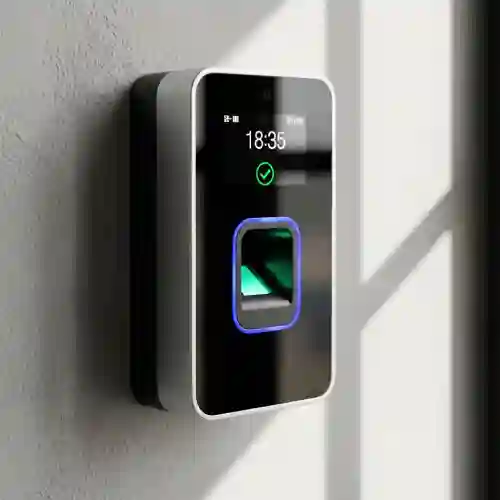
For a small business, buying an employee attendance machine does not necessarily mean spending a large amount on a complicated biometric system. A reliable fingerprint attendance machine can provide accurate employee check-in and check-out records while making attendance management easier for HR and administration teams.
However, there are many models available from brands such as ZKTeco and Hikvision, and their features can vary considerably.
A small office with 20 employees does not need the same device as a company with 200 employees. Similarly, a business that only needs attendance should not necessarily pay for an advanced access-control terminal.
This guide looks at several practical fingerprint biometric models and explains which type of business each one can suit.
What Should You Look for in a Fingerprint Attendance Machine?
Before choosing a model, consider these five factors:
1. Number of Employees
The first consideration is the number of employees who will use the machine.
For example, a small office may only need 500–1,000 fingerprint templates, while a growing company may benefit from a device supporting 3,000 or more fingerprints.
2. Attendance Transaction Capacity
Fingerprint capacity and transaction capacity are different.
Fingerprint capacity refers to how many biometric templates can be registered.
Transaction capacity refers to how many attendance records the terminal can store.
A device with 3,000 fingerprints and 100,000 transactions, for example, provides considerably more storage than a basic terminal.
3. Connectivity
If HR needs to download attendance information regularly, connectivity becomes important.
Common options include:
- USB
- TCP/IP
- Wi-Fi
- RS-485
For a networked office, TCP/IP can be particularly useful because the attendance terminal can communicate with a computer or server over the local network.
4. Attendance Software
The machine records attendance, but the software is what turns those transactions into useful reports.
Depending on the system, you may need:
- Employee management
- Shift management
- Late-coming reports
- Early-leaving reports
- Overtime
- Leave management
- Department management
- Monthly attendance reports
5. Attendance or Access Control?
This is an important distinction.
Some fingerprint terminals are designed mainly for time attendance, while others combine attendance with door access control.
If you want the device to control an office door, check that it has the required lock, exit button, door sensor and access-control interfaces.
Recommended Fingerprint Attendance Machines
1. ZKTeco K40 – Practical Choice for Small Offices
 The ZKTeco K40 is a well-known biometric time attendance terminal aimed at organizations that need fingerprint attendance with straightforward connectivity.
The manufacturer’s specifications list 3,000 fingerprint templates, 3,000 card capacity, and 100,000 transactions. It supports TCP/IP and USB Host, and also includes a built-in backup battery.
ZKTeco K40 specifications
| Feature | K40 |
|---|---|
| Fingerprint capacity | 3,000 |
| Card capacity | 3,000 optional |
| Transaction capacity | 100,000 |
| Communication | TCP/IP, USB Host |
| Display | 2.8-inch TFT |
| Backup battery | Yes |
| Access control | Basic |
| Suitable for | Small & medium businesses |
Why consider the K40?
The K40 makes sense when you need a dedicated attendance machine rather than an advanced facial-recognition terminal.
It can be suitable for:
- Small offices
- Shops
- Warehouses
- Workshops
- Schools
- Small factories
- Service companies
Its TCP/IP connection also makes it more convenient for businesses that want to manage attendance from a PC.
Best suited for: businesses looking for a straightforward fingerprint attendance solution with good storage capacity.
2. ZKTeco F18 – Attendance Plus Door Access Control
 If your requirement goes beyond attendance and you also need to control an office door, the ZKTeco F18 is worth considering.
The F18 is primarily a biometric access-control terminal, but it can also be used in attendance applications through compatible ZKTeco software. The manufacturer lists 3,000 fingerprint templates, optional card support, TCP/IP, USB Host and Wiegand interfaces.
It also provides interfaces for an electric lock, door sensor, exit button and alarm.
ZKTeco F18 specifications
| Feature | F18 |
|---|---|
| Fingerprint capacity | 3,000 |
| Card capacity | Up to 5,000 optional |
| Communication | TCP/IP, RS232/485, USB Host |
| Wiegand | Input/Output |
| Display | 2.4-inch TFT |
| Access control | Yes |
| Door lock interface | Yes |
| Anti-passback | Supported |
| Suitable for | Attendance + access control |
The F18 is therefore more appropriate when a company wants to combine employee attendance and door access in one biometric terminal.
Best suited for: offices where employees should use the same fingerprint terminal for attendance and door entry.
3. Hikvision DS-K1T804AMF – Fingerprint + Card + Wi-Fi

For businesses already using Hikvision security products, the Hikvision DS-K1T804AMF is another model to consider.
According to Hikvision’s specifications, the terminal supports 3,000 fingerprints, 3,000 cards and 100,000 events. It supports TCP/IP and Wi-Fi, along with RS-485, Wiegand, USB and door-control interfaces.
DS-K1T804AMF specifications
| Feature | DS-K1T804AMF |
|---|---|
| Fingerprint capacity | 3,000 |
| Card capacity | 3,000 |
| Event capacity | 100,000 |
| Fingerprint recognition | <1 second |
| Network | TCP/IP |
| Wi-Fi | Yes |
| RS-485 | Yes |
| Wiegand | Yes |
| USB | Yes |
| Door control | Yes |
| Fingerprint sensor | Optical |
One advantage of this model is its combination of fingerprint, card and network connectivity.
It can therefore be considered for businesses that want biometric authentication but also want employees to have card-based authentication as an alternative.
Best suited for: small and medium businesses already using Hikvision access-control infrastructure.
4. Hikvision DS-K1T342MFWX – Upgrade to Face + Fingerprint

If you are willing to move beyond a basic fingerprint machine, the Hikvision DS-K1T342MFWX provides multiple authentication methods.
Hikvision lists support for 1,500 faces, 3,000 fingerprints, 3,000 cards and 150,000 events. It also supports TCP/IP, Wi-Fi and PoE, depending on the configuration.
DS-K1T342MFWX specifications
| Feature | DS-K1T342MFWX |
|---|---|
| Face capacity | 1,500 |
| Fingerprint capacity | 3,000 |
| Card capacity | 3,000 |
| Event capacity | 150,000 |
| Face recognition | <0.2 second |
| Fingerprint recognition | <1 second |
| Face accuracy | >99% according to manufacturer specification |
| Wi-Fi | Yes |
| TCP/IP | Yes |
| PoE | Yes |
| Touchscreen | 4.3-inch |
| Access control | Yes |
This is not the cheapest type of biometric terminal, but it can be a useful upgrade for businesses that want face recognition and fingerprint authentication in the same device.
Best suited for businesses looking for a more modern biometric attendance and access-control system rather than a basic fingerprint-only machine.
ZKTeco vs Hikvision for Small Businesses
Both brands have models suitable for small and medium-sized organizations, but the right choice depends on the existing infrastructure and the required features.
| Feature | ZKTeco K40 | ZKTeco F18 | Hikvision DS-K1T804AMF | Hikvision DS-K1T342MFWX |
|---|---|---|---|---|
| Fingerprint | ✓ | ✓ | ✓ | ✓ |
| Face recognition | — | — | — | ✓ |
| Card | ✓ Optional | ✓ Optional | ✓ | ✓ |
| TCP/IP | ✓ | ✓ | ✓ | ✓ |
| Wi-Fi | — | Optional | ✓ | ✓ |
| USB | ✓ | ✓ | ✓ | ✓ |
| Door access | Basic | ✓ | ✓ | ✓ |
| Fingerprint capacity | 3,000 | 3,000 | 3,000 | 3,000 |
| Transaction/event storage | 100,000 | Model-dependent | 100,000 | 150,000 |
| Best use | Attendance | Attendance + access | Attendance + access | Face + fingerprint |
Specifications can vary by regional version or firmware, so confirm the exact model supplied before purchase.
Which Fingerprint Machine Should a Small Business Choose?
Instead of choosing a machine simply because it has the lowest price, match the device to your actual requirement.
For basic employee attendance
Consider the ZKTeco K40.
It provides fingerprint attendance, TCP/IP, USB Host and substantial transaction storage without requiring an advanced face-recognition terminal.
For attendance + door access
Consider the ZKTeco F18.
It provides fingerprint authentication together with interfaces for electric locks, door sensors, exit buttons and other access-control components.
For Hikvision-based installations
Consider the Hikvision DS-K1T804AMF.
It provides fingerprint and card authentication, 100,000-event storage, TCP/IP and Wi-Fi, plus access-control interfaces.
For face + fingerprint attendance
Consider the Hikvision DS-K1T342MFWX.
It supports face, fingerprint and card authentication and offers higher event capacity than the DS-K1T804AMF.
Fingerprint Attendance vs Face Recognition
Fingerprint remains a practical option for businesses that want to control costs.
However, face recognition can provide a more touchless employee authentication process.
Fingerprint attendance
Advantages:
- Generally economical
- Simple employee enrollment
- Familiar authentication method
- Suitable for many small offices
- Can be combined with RFID cards
Face recognition
Advantages:
- Touchless authentication
- Fast verification
- Useful for busy entrances
- Can be combined with fingerprint and cards
For a small office with a limited budget, a fingerprint-only machine can be sufficient. For a company planning a more advanced biometric system, a hybrid face-and-fingerprint terminal may provide greater flexibility.
What About ZKTeco Software?
Hardware selection should not be separated from software selection.
For example, ZKTeco lists software compatibility for its devices including ZKBioTime 8.0 and other ZKTeco software platforms, depending on the model and configuration.
Before purchasing, confirm:
- Which software is included
- Number of employees supported
- Number of attendance devices supported
- Shift configuration
- Overtime calculation
- Leave management
- Report formats
- Remote/network management
- Payroll export requirements
A good attendance machine with unsuitable software can still create problems for HR.
How Much Should a Small Business Spend?
There is no universal “best price” because the final cost depends on the model, software, installation, networking and whether access-control hardware is included.
A sensible approach is to divide the requirement into three levels:
Entry Level
Fingerprint attendance only
Suitable for a small office that simply needs electronic attendance records.
Mid Range
Fingerprint + card + network + attendance software
Suitable for companies that need more flexible authentication and centralized attendance management.
Advanced
Face + fingerprint + card + access control
Suitable for companies that want a more complete biometric security and attendance solution.
Important: Don’t Buy Based on Fingerprint Capacity Alone
A common mistake is to compare machines only by the number of fingerprints they can store.
For example, two machines may both support 3,000 fingerprints but provide very different capabilities.
One may offer:
- USB only
while another may provide:
- TCP/IP
- Wi-Fi
- Card authentication
- Door control
- Higher transaction storage
- Face recognition
- Centralized software support
Therefore, compare the complete specification, not just the fingerprint capacity.
Final Recommendation
For a small business looking for an affordable and practical fingerprint attendance solution, the ZKTeco K40 is a model worth considering when the requirement is primarily employee attendance.
If you also need door access control, the ZKTeco F18 provides the additional access-control interfaces required for an integrated installation.
For businesses using or planning to use Hikvision infrastructure, the DS-K1T804AMF provides fingerprint, card, network and access-control functions.
And if you want to move toward face recognition + fingerprint + card authentication, the Hikvision DS-K1T342MFWX is a more advanced option.
The right fingerprint attendance machine ultimately depends on your employee count, attendance requirements, connectivity, software, budget and whether access control is also required.
Need Help Choosing a Fingerprint Attendance Machine?
Before purchasing, provide the supplier with:
Number of employees + number of doors + attendance only or access control + fingerprint/face requirement + preferred connectivity.
This allows the correct biometric terminal and software to be selected rather than simply choosing the cheapest machine.
Looking for fingerprint attendance machines in Dubai, UAE? Contact a biometric system supplier for model availability, installation and attendance software options.